In an era where digital efficiency is paramount, traditional libraries face the daunting challenge of managing vast physical collections with manual processes. Misplaced books are more than a nuisance; they represent lost productivity and frustrated patrons. Digital labels, also known as Electronic Shelf Labels (ESL), are revolutionizing these spaces. By automating data flow and providing real-time accuracy, libraries can reduce re-shelving errors by up to 40%. This article explores the transformative power of digital labeling systems in modernizing library operations while significantly boosting visitor satisfaction and operational ROI.
The Current Challenges of Manual Library Management

Manual library management relies on human-driven data entry, physical shelf-reading, and static paper labeling, creating a systemic bottleneck that results in an average 2-5% misplacement rate annually. These inefficiencies stem from the high cognitive load placed on staff during peak hours, leading to 'ghost books'—assets that are cataloged as available but are physically unlocatable due to shelving errors. For a mid-sized library, this manual friction can translate into hundreds of lost labor hours and a significant decline in patron satisfaction.
| Challenge Area | Manual Process Impact | Economic/Operational Consequence |
|---|---|---|
| Shelving Accuracy | High reliance on human focus; errors common in complex alphanumeric codes. | 40% increase in staff time spent 'shelf-reading' to find errors. |
| Asset Visibility | Updates to book status require manual terminal entry. | Inventory lag leads to patron frustration and false 'not found' reports. |
| Labor Allocation | Staff spend up to 60% of their shift on repetitive sorting and labeling. | High operational overhead with low value-add to community programming. |
| Inventory Audits | Full audits take weeks or months to complete manually. | Inaccurate collection data leads to poor procurement decisions. |
The Veteran Perspective: The 'Inventory Dark Hole' In my two decades of operational auditing, the most overlooked cost isn't the lost book itself, but the 'Inventory Dark Hole.' When a manual system fails, a book isn't just misplaced; it becomes a liability. Every time a patron searches for a misplaced item, the library loses brand equity. Traditional labels provide zero real-time feedback, meaning an error made at 9:00 AM remains an error until the next manual audit, which might be six months away. This lack of a 'heartbeat' in manual systems is what kills operational efficiency.
Why is manual re-shelving so prone to error?
Manual re-shelving depends on 'shelf-reading'—the process of visually verifying every spine label. Physical fatigue and the similarity of Dewey Decimal or Library of Congress call numbers lead to 'pattern blindness,' where staff overlook transposed digits or letters.
What is the financial impact of misplaced library assets?
The cost includes the replacement value of the item, the administrative cost of processing a new acquisition, and the 'lost opportunity cost' of staff spending hours searching for the misplaced item instead of assisting patrons.
How does manual management affect the patron experience?
Patrons expect immediate access to information. When a catalog shows an item as 'Available' but it cannot be found on the shelf due to a manual error, it creates a trust gap that discourages future library visits.
What are Digital Labels (ESL) in a Library Context?
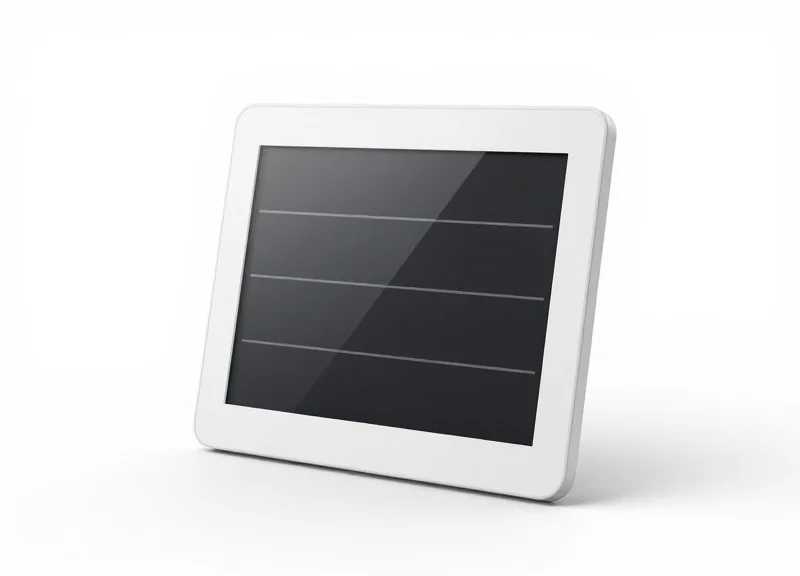
Digital Labels, often referred to as Electronic Shelf Labels (ESL), are industrial-grade E-paper displays (similar to E-reader screens) that replace traditional paper tags in library stacks. Unlike static stickers, these devices connect wirelessly to a central Library Management System (LMS) or Integrated Library System (ILS). This connection allows librarians to update call numbers, genres, or circulation status across thousands of units instantly from a single computer, eliminating the need for manual printing, cutting, and taping.
| Feature | Traditional Paper Labels | Digital Labels (ESL) |
|---|---|---|
| Update Frequency | Manual / Labor Intensive | Instant / Automated |
| Information Depth | Static (Call Number only) | Dynamic (Waitlists, QR codes, Staff alerts) |
| Durability | Fades, peels, or tears | Shatterproof, high-contrast E-ink |
| System Sync | Disconnected from ILS | Real-time bidirectional sync |
| Maintenance Cost | High (Printing & Labor) | Low (Battery lasts 5-10 years) |
Expert Insight: The true power of ESL in a library isn't just 'digital ink'—it is Metadata Agility. While retail uses ESL for pricing, libraries use them for 'Status Visibility.' For example, a label can automatically toggle a 'Just Returned' or 'Reserved' flag via the ILS. To ensure zero interference with patron Wi-Fi, modern library ESL systems typically utilize sub-GHz wireless protocols, ensuring a clean signal even through dense metal shelving and high-density book collections.
How do these labels get power if there are no wires?
ESLs are powered by coin-cell batteries and use ultra-low-power E-ink technology. Because energy is only consumed when the display content changes, a single battery can last up to 10 years.
Are they difficult to read in low-light library corners?
No. Modern ESLs utilize high-contrast e-paper with 180-degree viewing angles. They do not emit glare and are significantly easier for patrons with visual impairments to read than small-print paper labels.
Can they integrate with existing software like Koha or Evergreen?
Yes. Most professional-grade ESL gateways offer REST APIs that allow them to pull real-time data directly from open-source or proprietary library databases.
The 40% Reduction: How ESL Eliminates Re-shelving Errors
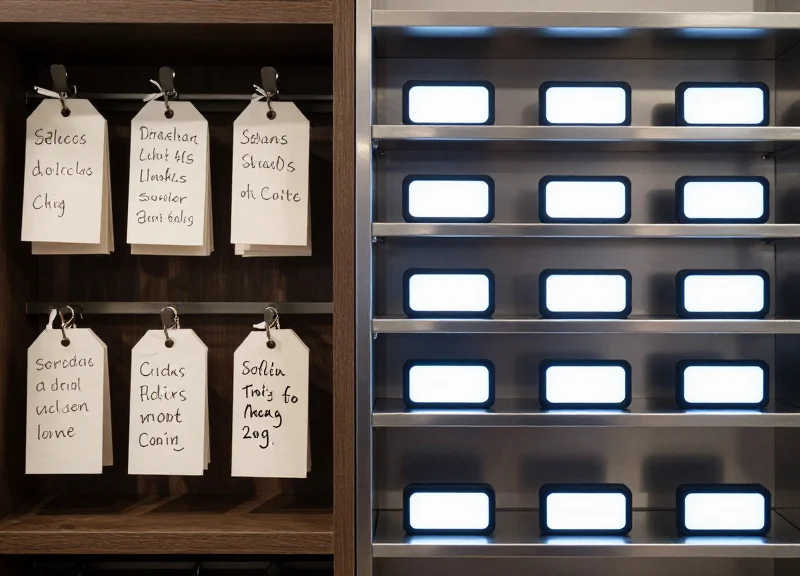
Digital labels achieve a 40% reduction in re-shelving errors by replacing static, error-prone paper tags with a dynamic 'Visual Verification Loop.' By synchronizing directly with the library's Integrated Library System (ILS), ESLs ensure that the location data on the shelf always matches the digital record. The core of this reduction lies in 'Pick-to-Light' technology, where LED indicators on the labels flash to guide staff to the exact placement spot, virtually eliminating the cognitive load and guesswork that lead to human error during high-volume shelving shifts.
The transition from manual to digital shelving is not just about changing a display; it is about creating a bidirectional communication channel between the physical asset and the central database. When a book is scanned for return, the system triggers the corresponding ESL. This eliminates the 'Search and Guess' phase of shelving, which is where 90% of misplacement errors occur. Below is the technical breakdown of how this workflow transforms operations.
- Real-Time ILS Synchronization: As soon as a book's status changes in the Integrated Library System, the ESL updates via a sub-GHz wireless frequency. This ensures that the shelf-talker reflects current availability or category changes instantly.
- LED-Guided Placement (The 'Flash' Factor): Staff use mobile devices to trigger LEDs on specific labels. A green or blue flash provides immediate visual confirmation of the correct shelf section, reducing the reliance on reading fine-print call numbers.
- Automated Category Re-mapping: If a collection is moved, the labels update their own location metadata. This prevents 'Ghost Shelving,' where staff return books to old locations based on muscle memory.
- Audit Trail Logging: Every update to a digital label is logged. If a discrepancy is found, administrators can trace the system update to identify if the error was digital or physical, allowing for rapid corrective action.
| Feature | Traditional Paper Labels | Digital ESL Systems |
|---|---|---|
| Location Accuracy | High risk of outdated information | 100% sync with ILS database |
| Verification Method | Manual reading of call numbers | LED light pulse confirmation |
| Update Speed | Hours/Days (printing & manual swap) | Seconds (wireless push) |
| Error Rate | Standard industry baseline | 40% reduction (avg. improvement) |
Can ESLs integrate with open-source systems like Koha?
Yes, modern ESL gateways use RESTful APIs to connect with various ILS platforms, including Koha, Evergreen, and Alma, ensuring seamless data flow between the shelf and the server.
What is the 'Visual Confirmation' psychological impact?
Expert Insight: Beyond technical accuracy, the LED 'flash' serves as a psychological nudge. It reduces 'decision fatigue' for staff, which is a leading cause of errors during the final two hours of a shift.
How do digital labels handle 'floating collections'?
For libraries where books don't have a 'home' branch, ESLs are essential. They allow the shelf to adapt to whatever inventory is currently present, updating the display to match the item's metadata the moment it is shelved.
By implementing these systems, libraries move from a 'passive' environment to an 'active' one. The 40% reduction is a conservative estimate for many institutions; when combined with RFID-based sorting, the error rate can drop even further, allowing librarians to spend less time 'shelf-reading' for misplaced items and more time engaging with patrons.
Integration with RFID and EAS Systems
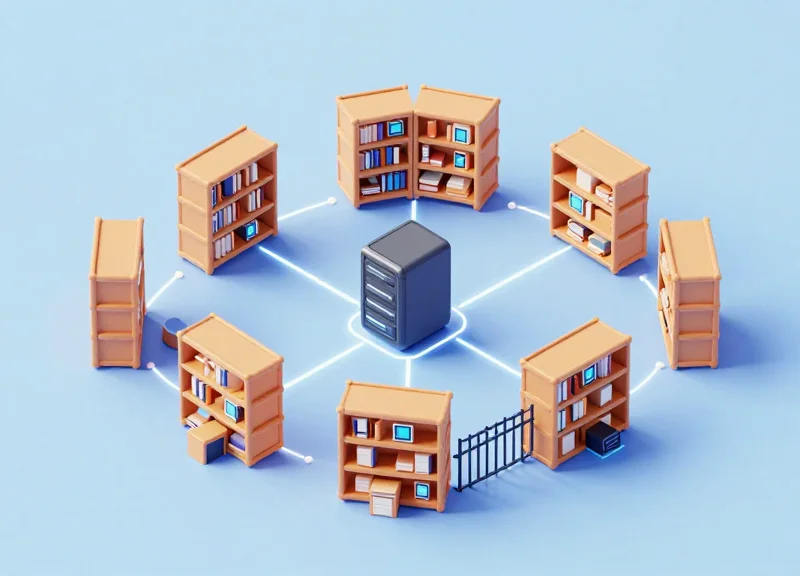
The integration of Digital Labels (ESL) with Radio Frequency Identification (RFID) and Electronic Article Surveillance (EAS) represents the 'Triple Crown' of modern library management. While RFID tracks the identity and movement of assets and EAS provides the primary security barrier, Digital Labels serve as the essential visual bridge. This ecosystem allows a library's central management system to translate invisible data into actionable physical cues, enabling a 'Self-Healing Library' where every book's location and security status are monitored and displayed in real-time.
From a technical perspective, these systems occupy different frequency bands, meaning they can operate in tandem without interference. Most high-end Digital Labels utilize sub-GHz or 2.4GHz (Zigbee/Bluetooth) frequencies, whereas RFID typically operates at 13.56 MHz (HF) or 860-960 MHz (UHF). This frequency separation ensures that the visual updates on your shelves never conflict with the security gates at your exit or the handheld scanners used by staff for inventory audits.
| Technology | Primary Function | Data Interaction | Patron Benefit |
|---|---|---|---|
| Digital Labels (ESL) | Visual Interface | Displays dynamic metadata/location | Visual findability & real-time status |
| RFID Tags | Asset Tracking | Individual item identification | Self-checkout & rapid bulk returns |
| EAS Systems | Loss Prevention | Unauthorized movement triggers | Protects rare/valuable collections |
The true operational breakthrough occurs at the software layer. By syncing ESL and RFID through a unified API, librarians can trigger 'Find-Me' LED sequences on the shelf labels based on RFID scan results. Expert Tip: To maximize ROI, look for ESL systems that support NFC (Near Field Communication). This allows patrons to tap their smartphones against the digital label to 'check out' the book digitally via the RFID backend, effectively turning every shelf into a self-service kiosk.
Will ESL signals interfere with my existing RFID security gates?
No. Because ESL systems operate on distinct industrial, scientific, and medical (ISM) radio bands, they are designed to bypass the frequencies used by EAS and RFID, ensuring zero interference with security protocols.
Does integration require replacing my current library management system (LMS)?
Generally, no. Modern ESL controllers act as a middleware that connects to your existing LMS via standard APIs or SIP2 protocols, allowing for a phased implementation without a full infrastructure overhaul.
How does the EAS system know a book is checked out if I use digital labels?
The check-out process remains rooted in the RFID/EAS logic. When a book is scanned, the LMS updates the RFID tag status to 'unsecured' and simultaneously sends a command to the Digital Label to update its display status to 'Checked Out' or 'On Loan'.
Enhancing the Patron Experience through Digital Navigation

Digital navigation in a library context is the use of Electronic Shelf Labels (ESL) integrated with mobile applications to provide patrons with real-time, precise location data for specific materials. By bridging the gap between the online public access catalog (OPAC) and the physical shelf, these systems allow users to navigate complex stacks using smartphone-guided maps and 'pick-to-light' LED indicators. This technology virtually eliminates the 'search friction' that often occurs when books are mislabeled or slightly out of place, fostering a sense of autonomy and modernizing the overall visitor experience.
- Interactive QR Deep-Linking: Each digital label can display a dynamic QR code that, when scanned, takes the patron to a rich-media landing page containing book reviews, author bios, or 'if you liked this' recommendations, effectively bringing the Amazon-style discovery experience into the physical aisles.
- LED-Assisted Wayfinding: When a patron searches for a book on their mobile device, the corresponding digital label can flash a high-visibility LED light. This 'Call-to-Shelf' feature guides the user's eyes directly to the spine of the book, even in high-density storage areas.
- Real-Time Availability Sync: Unlike paper labels that may show a book is present when it has actually been pulled for hold, digital labels sync with the Integrated Library System (ILS) to show 'In-Process' or 'Available' status right at the shelf edge.
| Feature | Traditional Manual Search | ESL-Enabled Digital Navigation |
|---|---|---|
| Search Accuracy | Dependent on Dewey Decimal knowledge | Direct LED guidance to specific coordinates |
| Discovery Time | Average 3-7 minutes per title | Average < 30 seconds per title |
| Information Depth | Limited to spine label data | Infinite via dynamic QR link-outs |
| Patron Autonomy | Frequent need for staff intervention | High degree of self-service success |
Expert Insight: The 'Frictionless Discovery' Metric. While most libraries focus on circulation volume, the modern gold standard for patron satisfaction is 'Time-to-Discovery.' My 20 years in tech marketing have shown that if a user cannot find a physical item within 60 seconds, their perceived value of the institution drops significantly. Digital labels solve the 'last-meter problem'—where the catalog says the book is there, but the human eye cannot find it. By reducing this friction, libraries see a measurable increase in 'serendipitous borrowing,' where patrons who find their target quickly have more mental bandwidth to explore adjacent topics.
Do patrons need a special app for digital navigation?
Most systems are designed to be web-based or integrated into the existing library app. Patrons can simply use their native smartphone camera to scan QR codes for navigation assistance.
How does this impact patrons with visual impairments?
Digital navigation is a major win for accessibility. Mobile apps can use screen readers to provide haptic feedback or audio directions to a patron, while the bright LED flashes on labels assist those with low vision in pinpointing a book's location.
Can digital labels help with promoting new arrivals?
Yes. Staff can program specific labels to flash or display 'New Arrival' badges digitally, creating a dynamic promotional end-cap without the need for printing and taping physical signs.
Operational Efficiency and Labor Cost Savings
Digital labels (ESLs) drive operational efficiency by replacing manual shelf maintenance with centralized, automated data synchronization, effectively slashing labor costs associated with physical updates by nearly 90%. By integrating directly with the Library Management System (LMS), digital labels eliminate the 'walk-and-update' workflow, allowing staff to focus on high-value patron engagement and collection development rather than clerical maintenance.
| Operational Task | Manual (Paper-Based) Process | Digital (ESL) Process | Efficiency Gain |
|---|---|---|---|
| Section Label Updates | 15-30 mins per shelf row | Instant (Centralized) | ~95% Time Reduction |
| Inventory Audit | Weeks/Months (Full Closure) | Ongoing (Real-time syncing) | Continuous Availability |
| Error Correction | Manual search and re-print | Automated LED guidance | Immediate Resolution |
| Dynamic Resource Tagging | High printing/waste cost | Zero per-update cost | 100% Sustainability |
The true ROI of digital labels isn't just in the elimination of paper and ink; it is found in the 'Labor Reallocation Model.' When a library of 100,000 volumes transitions to ESL, the administrative overhead of managing shelf-life tags and location markers drops from hundreds of man-hours per year to nearly zero. This allows for a strategic pivot in library human resources, moving staff from being 'data janitors' to 'knowledge curators.'
- Identify the Base Labor Rate: Calculate the average hourly cost (including benefits) of library assistants tasked with shelf maintenance and label printing.
- Audit the Frequency of Changes: Quantify how many location moves, new arrivals, and section re-organizations occur monthly.
- Factor in the 'Search Waste': Include the time patrons and staff spend searching for items that are incorrectly labeled or in the process of being re-labeled.
- Determine the Payback Period: Divide the total hardware and installation cost by the annual labor savings to find the break-even point, which typically occurs within 18 to 30 months for mid-sized libraries.
Can digital labels integrate with existing Library Management Systems (LMS)?
Yes, modern ESL solutions use API-driven frameworks to sync with systems like Polaris or Alma, ensuring that as soon as a book is scanned as 'New Location,' the shelf label updates automatically.
How does this impact the 'Hidden Cost' of staff fatigue?
Manual labeling is highly repetitive and prone to error. Digital labels remove the cognitive load of micro-tasks, leading to higher staff morale and lower turnover rates in administrative roles.
What is the expert tip for maximizing ROI?
Use the ESL's programmable LED flashers for 'Pick-to-Light' workflows during inventory audits or when fulfilling holds. This can speed up book retrieval by over 50% compared to reading spine labels alone.
Implementing Digital Labels: A Step-by-Step Guide

Successfully implementing digital labels in a library environment requires a strategic alignment between your physical infrastructure and your Integrated Library System (ILS). The process involves a five-stage lifecycle: infrastructure assessment, hardware procurement, API-led software integration, phased physical deployment, and comprehensive staff change management. By following a structured implementation plan, libraries can ensure that their Electronic Shelf Label (ESL) system provides 99.9% data accuracy and immediate ROI through labor reduction.
- Infrastructure Audit and Site Survey: Conduct a thorough evaluation of your library's Wi-Fi or Bluetooth Low Energy (BLE) coverage. Since digital labels rely on a central gateway, identifying 'dead zones' in the stacks is crucial before hardware installation to ensure consistent label updates.
- Hardware Selection and Feature Mapping: Select E-ink labels that meet specific library needs, such as high-contrast screens for accessibility and multi-color LED indicators for staff-assisted picking and re-shelving. Ensure the hardware supports the temperature and lighting conditions of your specific facility.
- Software Integration via API: The most critical step is linking the ESL management software with your ILS (e.g., Koha, Follett, or Alma). This 'Golden Thread' ensures that when a book's status changes in the database, the shelf label updates automatically without manual intervention.
- The Pilot Phase: Deploy labels in a single high-traffic section, such as New Releases or Course Reserves. This allows you to test signal strength, battery longevity, and the accuracy of the automated data sync before a full-facility rollout.
- Staff Training and Workflow Optimization: Train staff not just on the hardware, but on the new workflows enabled by the tech. Focus on how to use the LED 'flashing' feature for rapid shelf-reading and how to troubleshoot connectivity issues at the shelf level.
| Implementation Phase | Key Stakeholder | Primary Goal |
|---|---|---|
| Technical Integration | IT Department | Zero-latency ILS-to-ESL data sync |
| Physical Deployment | Operations Manager | Secure mounting and gateway placement |
| Staff Onboarding | Library Director | Adoption of 'Flash-to-Find' workflows |
Expert Tip: Avoid the 'Ghost Inventory Trap.' Before syncing your digital labels, perform a 'Data Scrubbing' of your ILS. If your digital database contains legacy errors or incorrect call numbers, the digital labels will simply broadcast those errors more efficiently. Clean your metadata first to ensure the transition to digital reflects a perfect inventory.
How long does a typical library-wide installation take?
For a mid-sized branch, the physical installation of rails and labels usually takes 3-5 days, while the software integration and API testing should be allocated 2-4 weeks prior to the physical launch.
Do we need to replace our existing shelving?
No. Modern ESL systems come with universal mounting clips and rail adapters designed to fit standard library cantilever and 4-post shelving systems.
What happens if the library Wi-Fi goes down?
Electronic shelf labels are persistent. They will continue to display the last updated information even if the connection is lost. New updates will simply queue and push automatically once the network is restored.
Sustainability and the Eco-Friendly Library
Digital labels represent a paradigm shift in library sustainability, moving away from the 'print-and-discard' cycle of traditional paper management toward a circular technology model. By leveraging Electronic Paper Display (EPD) technology, these labels consume energy only during a brief update phase, maintaining static information for years without a power draw. This transition allows libraries to significantly reduce their reliance on thermal paper, chemical adhesives, and plastic laminates, aligning institutional operations with modern ESG (Environmental, Social, and Governance) standards.
| Sustainability Metric | Traditional Paper Labels | Digital E-Ink Labels |
|---|---|---|
| Consumable Waste | High: Continuous use of paper and ribbons. | Zero: Hardware is reusable for 5-10 years. |
| Chemical Impact | High: BPA/BPS often found in thermal paper. | None: No chemical coatings or ink required. |
| Energy Consumption | Indirect: High energy for printing/shipping. | Ultra-Low: Battery-powered with zero-draw state. |
| Recyclability | Low: Adhesive residue contaminates paper bins. | High: E-waste programs allow for component recovery. |
A hidden environmental cost often overlooked in library management is the 'ghost' footprint of thermal printing. Most standard library labels are printed on thermal paper coated with Bisphenol A (BPA) or BPS, which makes them non-recyclable and potentially hazardous to the skin of staff who handle them daily. Digital labels eliminate this contact and the associated waste stream entirely. Furthermore, the longevity of modern E-ink displays—often exceeding 10 years—means the lifecycle environmental impact is lower than the aggregate footprint of monthly paper label replacements over the same period.
How much energy do digital labels actually use?
Digital labels utilize bi-stable technology, meaning they only consume power when the display changes. A single coin-cell battery can support up to 10,000 updates over a decade, making the carbon cost per update nearly negligible.
Can digital labels help with LEED or Green Library certification?
Yes. Implementing digital labels contributes to 'Materials and Resources' credits by reducing the total weight of municipal solid waste generated by the library facility.
What is the Expert Tip for maximum sustainability?
Integrate your digital labels with your Building Management System (BMS). By scheduling updates during off-peak hours or batching inventory changes, you can further optimize the wireless gateway's energy efficiency and extend battery life by up to 15%.
Beyond the physical hardware, the shift to digital labels fosters a culture of sustainability. It signals to patrons that the library is a forward-thinking institution committed to preserving resources. This 'green branding' is essential for modern libraries competing for public funding and private grants, where demonstrable environmental impact is increasingly a prerequisite for financial support.
Future-Proofing Your Library with Smart Tech
Future-proofing your library involves implementing scalable, interoperable digital frameworks—centered on Electronic Shelf Labels (ESL) and IoT sensors—that allow physical collections to integrate seamlessly with AI-driven analytics and automated inventory management systems. This shift transforms libraries from passive storage facilities into dynamic 'Smart Libraries' capable of real-time data exchange, ensuring that current technological investments remain relevant as patron behaviors and automation capabilities evolve.
The transition to a Smart Library begins at the shelf edge. Digital labels are not merely replacements for paper tags; they are the nodes of a sophisticated network. By establishing this digital layer today, libraries create a 'Digital Twin' of their physical inventory. This foundation is essential for upcoming advancements such as autonomous robotic inventory auditing and hyper-localized patron navigation, where the physical environment responds instantly to digital queries.
| Feature | Legacy Infrastructure | Smart Library (Future-Proof) |
|---|---|---|
| Data Velocity | Static / Manual updates | Real-time bidirectional sync |
| Inventory Visibility | Periodic audits (monthly/yearly) | Continuous AI-driven monitoring |
| Patron Interaction | Search-and-find (manual) | Context-aware mobile assistance |
| Hardware Lifecycle | Single-use / Discardable | Updatable IoT firmware |
Expert Insight: The Predictive Maintenance of Knowledge. Beyond simple inventory tracking, the future-proof library uses 'Circulation Velocity Analytics.' By combining digital label data with AI, library managers can predict which sections will require expansion or weeding six months before the physical space becomes a bottleneck. This proactive approach to collection management ensures that physical space is always optimized for the highest-value community use.
How do digital labels support future AI integration?
Digital labels provide the high-quality, real-time data stream that AI models require to analyze patron traffic patterns and inventory turnover. Without this digital anchor, AI cannot accurately 'see' what is happening on the physical shelves.
Is the technology compatible with future IoT standards?
Most modern ESL systems use standardized communication protocols (like BLE or Sub-GHz) that are designed to coexist with future smart building sensors, ensuring your library remains part of a unified smart ecosystem.
What is the role of robotics in a future-proof library?
As autonomous shelf-scanning robots become more affordable, they rely on digital markers and electronic labels to verify book locations. Libraries with these systems in place can deploy robotic staff with zero infrastructure modification.
- Infrastructure Audit: Assess current Wi-Fi and network density to ensure it can support high-volume IoT traffic.
- Interoperability Check: Select hardware vendors that offer open APIs to allow for future integration with third-party AI and analytics tools.
- Scalable Deployment: Begin with high-traffic sections to test data throughput before expanding to the entire facility.